You ask your personal agent to prepare a competitive briefing before your 3pm meeting. Two hours later, a summary lands in your inbox: three competitors’ recent product updates, pricing changes, and a comparison tailored to your calendar event’s agenda. You didn’t specify which competitors, which sources, or what format. The agent figured it out.
A personal agent is an AI system that perceives your digital environment, reasons about what to do, and takes real action on your behalf while learning who you are over time. The competitive briefing didn’t come from a single prompt-and-response exchange. It came from five architectural components working in a loop: a reasoning engine, a memory system, tool integrations, a perception layer, and an approval mechanism. This article pulls that engine apart.
What are the five components of a personal agent?
Think about the last time you hired someone. Before they could do anything useful, they needed five things: the ability to think through problems, knowledge of your preferences, access to the right tools, awareness of what’s happening around them, and clarity on what decisions they could make without checking with you first.
A personal agent needs the same five things. Remove any one and what you’re left with isn’t really an agent.
| Component | What it does | Without it, you get… |
|---|
| Reasoning engine | Breaks goals into sub-tasks, plans sequences, adapts when steps fail | A script that follows a fixed path and breaks at the first surprise |
| Memory system | Stores who you are, what you’ve said, what it’s observed, what you’ve corrected | A tool that forgets you every session |
| Tool integration (MCP) | Connects to email, calendar, files, browser, APIs, messaging | An AI that can think but can’t do anything |
| Perception layer | Monitors your environment for triggers, changes, and incoming signals | A reactive system that only moves when you ask |
| Approval layer | Decides what needs your sign-off and what it handles autonomously | Either an assistant that interrupts you for everything, or a rogue agent you can’t trust |
These five don’t sit in separate boxes. They form a loop. The agent perceives something in your environment, reasons about what to do, picks the right tools, takes action, stores the outcome in memory, and uses what it learned next time. That loop runs continuously. Not just when you’re talking to it.
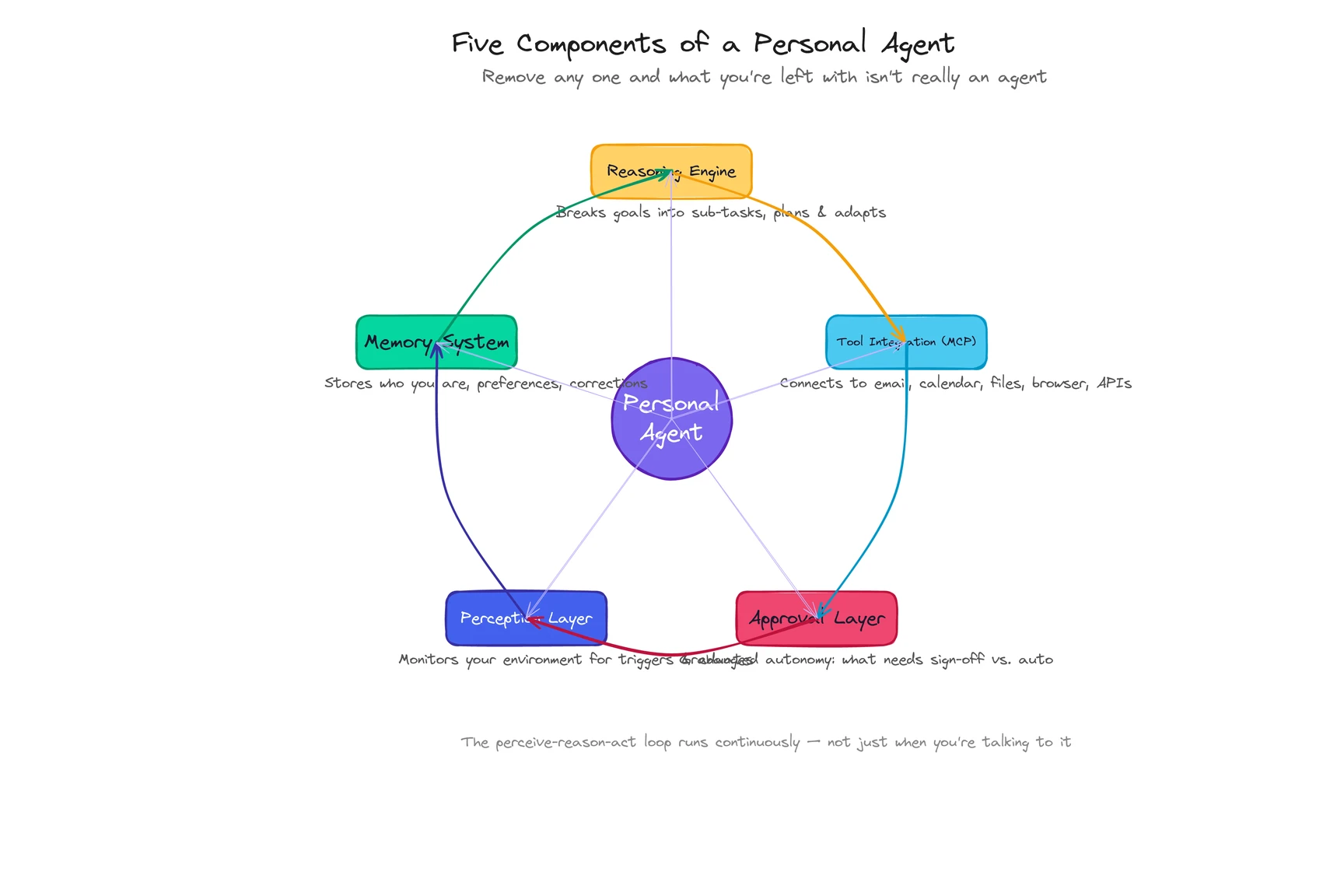
Let me walk through how this actually plays out, using that competitive briefing as the thread.
How does the perceive-reason-act loop work?
Every AI agent follows three steps: perceive, reason, act. What makes a personal agent different is that the loop runs in the context of one specific person, with one specific memory, all the time.
Perceive. The agent picks up your request for a competitive briefing. But perception isn’t just listening for instructions. It also noticed, 20 minutes ago, that a new email from your VP mentioned the same competitor. It saw the calendar event had an agenda attached. It caught that one of the three competitors updated their pricing page last night (something you’d asked it to track two weeks ago). A chatbot would have waited for you to paste all of that in. The personal agent already had it.
Reason. The reasoning engine, powered by a large language model, decomposes your one-sentence request into a plan. Which competitors? It checks memory: you’ve asked about these three before. What format? You told it last month you prefer bullet points over prose for briefings. What sources? It decides on competitor websites, their changelogs, and the pricing page it’s been monitoring. It also pulls the meeting agenda to tailor the comparison. None of this was scripted. The agent constructed the plan from what it knows about you and this specific task.
Act. The agent executes: browses three competitor sites, reads the calendar event via API, cross-references with the email thread, drafts the briefing, and delivers it to your inbox. Each action produces a result the agent evaluates. If a competitor site is down, it adapts and checks their Twitter instead. If the briefing format doesn’t match what you corrected last time, it adjusts before sending.
Here’s the part that compounds. After the briefing lands, the loop doesn’t stop. You open it. You delete one competitor and add a note: “Focus on the other two next time.” That correction enters memory. Next month’s briefing is different. Better.
The perceive-reason-act loop isn’t a one-time sequence. It’s the operating rhythm of the entire system. (Honestly, calling it a “loop” undersells it. It’s more like breathing.)
See how ego handles multi-step workflows like this ->
How does memory work inside a personal agent?
Memory is what makes all the other components personal. Without it, you have a very capable goldfish: brilliant in the moment, blank the next time you talk to it.
The full architecture involves four layers: what you’ve told the agent (explicit), what it’s observed about your behavior (behavioral), what’s happening in your world right now (contextual), and what you’ve corrected (corrections that become permanent adjustments). We cover these in depth in What Is a Personal Agent?, so I won’t repeat the full breakdown here.
What matters for understanding how personal agents work is how memory plugs into the loop.
When the reasoning engine plans your competitive briefing, it doesn’t start from scratch. It pulls from memory: which competitors you care about, which format you prefer, what you changed last time, and what projects are top of mind this week. Every decision the reasoning engine makes is filtered through what the memory system knows about you.
And every outcome feeds back in. You edited the briefing? Memory stores the edit. You ignored a section? Memory notes that too. Products like ego build preference profiles from browsing behavior, desktop activity, and interaction patterns, capturing things you’d never think to articulate in a prompt. You don’t have words for most of your habits. You just have them.
The result is a flywheel. More usage builds richer memory. Richer memory produces better output. Better output earns more trust. More trust means more usage. After a week, the agent knows your basics. After a month, it anticipates your patterns. That’s the architecture doing its job.
What is MCP and why does it matter?
An agent that can reason but can’t act is just a chatbot with better internal monologue. The tool integration layer is what gives a personal agent hands.
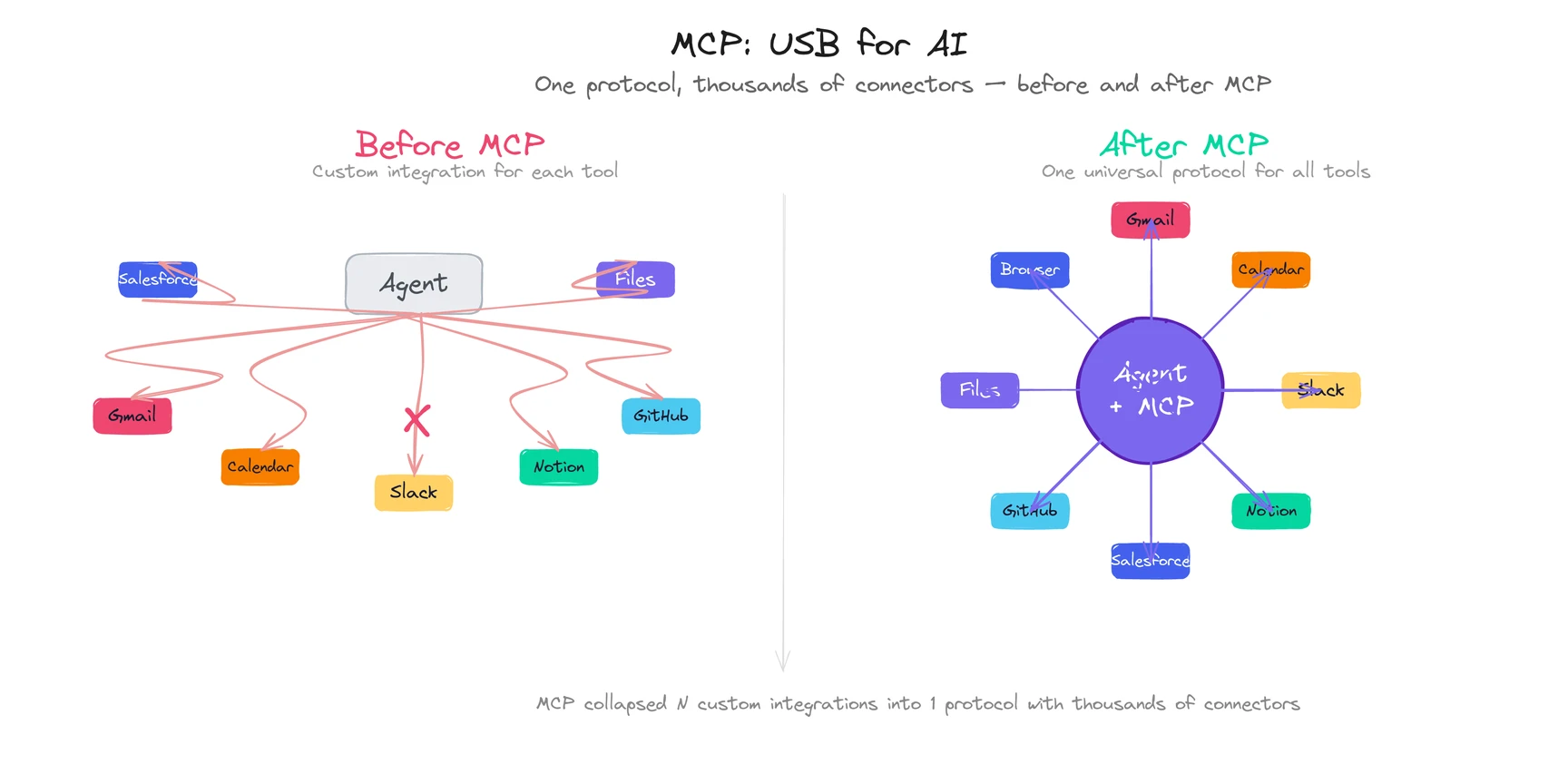
MCP (Model Context Protocol), created by Anthropic, has become the standard way AI agents connect to external tools. Think of it as USB for AI: one universal interface that lets an agent plug into any compatible service without custom code.
Before MCP, connecting an agent to Gmail required building a custom Gmail integration. Connecting it to Google Calendar meant another custom integration. Every new tool was a separate engineering project. MCP collapsed that: one protocol, thousands of connectors. (The path to this standard was decades in the making — tool calling had to become reliable before MCP could standardize it.)
By early 2026, MCP servers exist for Gmail, Google Calendar, Slack, Notion, Salesforce, Shopify, GitHub, local file systems, and hundreds more. The practical impact: when your personal agent prepared that competitive briefing, it didn’t need a hand-built “competitor research” feature. It used a web browser MCP to visit competitor sites, a calendar MCP to read the meeting agenda, and an email MCP to deliver the result. Three standard connectors, assembled on the fly.
| Tool category | What it enables | Examples |
|---|
| Email | Read, compose, send, organize | Gmail, Outlook |
| Calendar | Read events, create/modify meetings, check conflicts | Google Calendar, iCal |
| File system | Read, create, organize, search files | Local files, Google Drive, Dropbox |
| Web browser | Research, fill forms, extract data, monitor pages | Any website |
| Messaging | Read and send messages across platforms | Slack, Telegram, Teams |
| SaaS APIs | Interact with business tools | CRM, project management, analytics |
The scope of tools is what separates a personal agent from an AI browser (limited to browser tabs) or a voice assistant like Siri (locked inside one ecosystem). A personal agent reaches everywhere your work lives. That cross-life scope, combined with exclusive alignment and identity-level memory, is what makes “personal” a category, not a feature.
But here’s the uncomfortable truth about tool integration in 2026: your agent can only reach tools that have MCP servers or APIs. If your company runs a proprietary internal system with no API, the agent can’t touch it. The ecosystem is growing fast (Anthropic reports thousands of MCP connectors), but gaps still exist. Ask about integration coverage before committing to any product.
Explore ego’s cross-platform capabilities ->
How does a personal agent decide what to do on its own?
This is the component nobody talks about enough. And it’s the one that determines whether a personal agent feels trustworthy or terrifying.
The approval layer answers one question: should the agent act on its own, or ask you first?
Get this wrong and you end up with one of two bad outcomes. An agent that requests permission for every tiny action, which is just a slower way to do the work yourself. Or an agent that freelances on high-stakes decisions, which destroys trust the first time it sends an email you didn’t approve.
The best implementations work on a graduated spectrum:
| Permission level | What the agent does | Example |
|---|
| Full autonomy | Acts without asking | Check your calendar, summarize an email, run a web search |
| Notify after | Acts, then tells you what it did | Draft a reply, organize files, create a meeting summary |
| Ask before | Presents a plan, waits for approval | Send an email to a client, schedule with external participants |
| Never autonomous | Only acts with explicit instruction | Delete files, share sensitive information, respond to the CEO |
What makes this work isn’t the initial settings. It’s that the boundaries move.
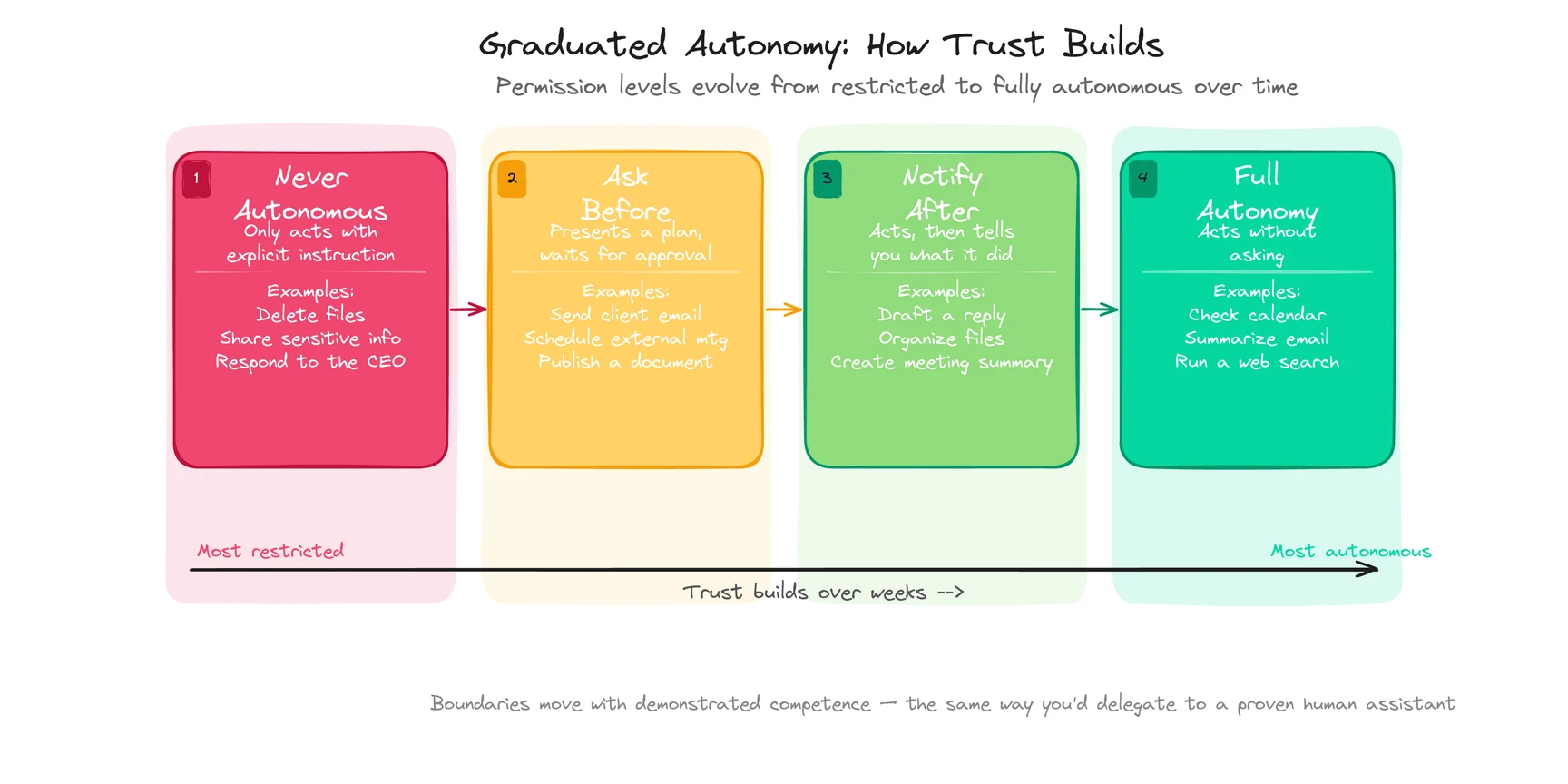
A new user might require approval for every email draft. After a month, the agent has gotten 50 drafts right in a row, and the user shifts email drafting to “notify after.” Six months in, routine replies happen on full autonomy. The permission level rises with demonstrated competence, the same way you’d delegate to a human assistant after they’d proven themselves.
For the competitive briefing: the agent assembled and delivered it without asking because you’d approved similar briefings twelve times before. But if it had discovered a competitor was acquiring one of your partners (something it had never briefed on), it would have flagged it for your review instead of burying it in the standard format. Knowing when to escalate is the whole game.
This graduated autonomy is what makes personal agents practical. Without it, you’re either micromanaging the AI or hoping it doesn’t make a consequential mistake. Neither works.
Try ego and see graduated autonomy in action ->
![Cover image for What Is a Personal Agent? Definition, Examples, and How It Works [2026]](/images/blog/what-is-a-personal-agent-cover.svg)